


Create a portal
One for each client or project.
Give it a name and a short welcome message. Leave the name blank and AI suggests one from the welcome message.
Branded external workspaces where clients view files, approve work, answer questions, and send uploads, all behind a magic link.
Free trial included No credit card needed Your prompts stay private
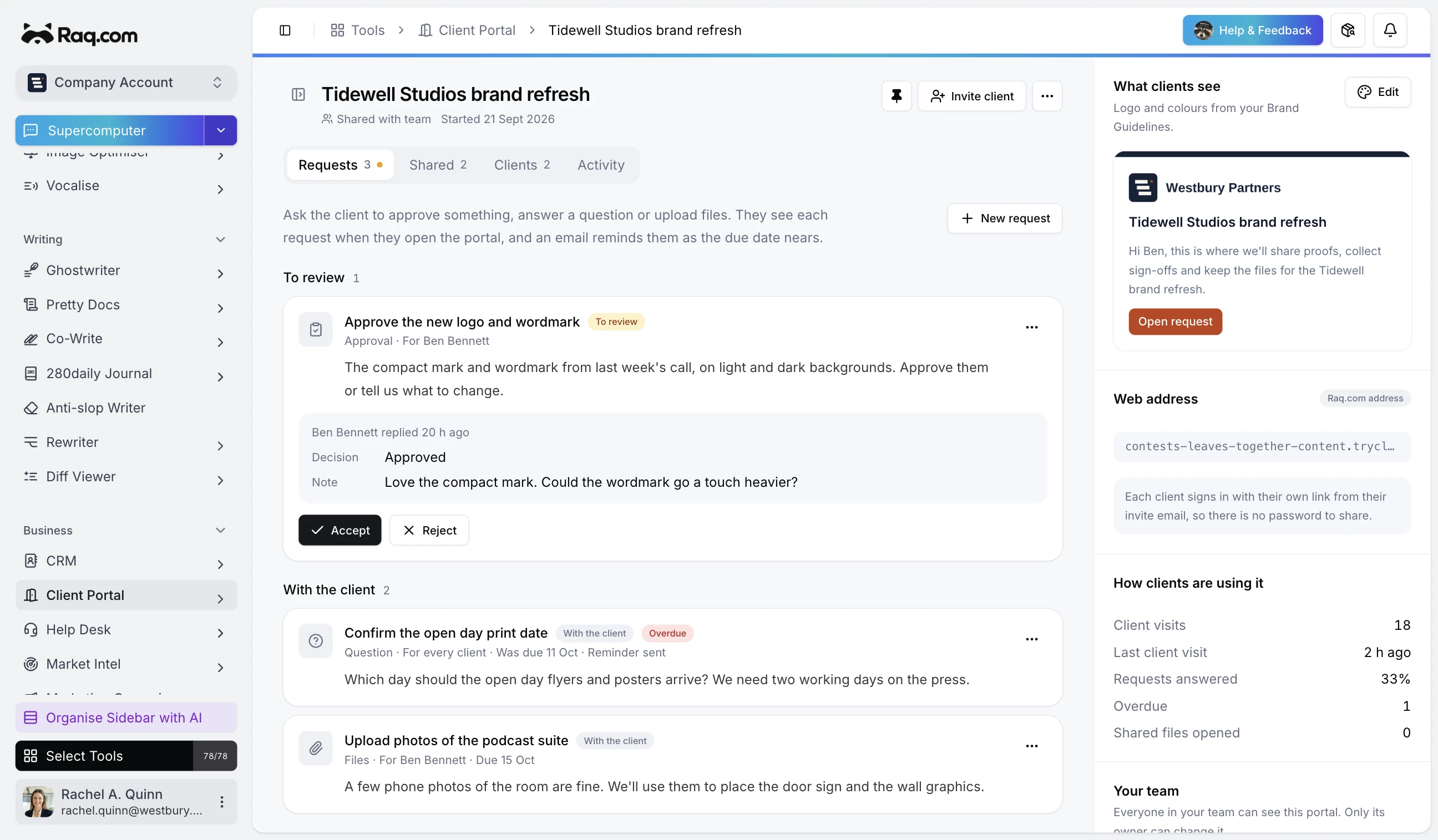
Create a branded portal per client or project, share files and tasks, request uploads or approvals, and let clients in via a magic link, no password. Branding pulls from your Brand Guidelines with per-portal overrides. Activity is tracked in a client-friendly timeline.
Works in Claude, ChatGPT Work, Grok Bot and any AI app with connectors. Connect yours
Ask the client for these missing documents.
I’ll create an upload request in Client Portal and give the client a link. Received files will stay with their project.
One for each client or project.
Give it a name and a short welcome message. Leave the name blank and AI suggests one from the welcome message.
Each person gets their own link by email.
Add the people at the client who need it. Admins see every request. Viewers see the requests for everyone plus the ones assigned to them.
Files, cards and requests.
Share files from File Drop and cards from a Task Board. Ask for an approval, an answer or an upload, with a due date if there is one.
Visits, downloads and answers.
The activity timeline shows who opened the portal, what they viewed or downloaded and what they sent back. You accept or reject each answer.
Use the logo and colours from your Brand Guidelines, or set a logo, main colour and accent colour for one portal.
Run a portal on a subdomain such as portal.yourfirm.com. Invite links use your address and the Raq.com footer is removed.
If a request is still open when its due date passes, the client gets one reminder email and you get a notification in Raq.com.
Connect Claude, ChatGPT or another agent to Raq.com and it can set up portals, invite clients, share files, send requests and tell you which answers are waiting. Clients only see the portal.
Client Portal is included in every Raq.com plan. From $39 per user a month, with 75+ modules. Optional AI features use your plan's usage allowance. A focused alternative to SuiteDash, Clinked and Assembly.
Free trial included No credit card needed Your prompts stay private
We use optional cookies to understand how people find this site and to measure our ads.