


Introducing Live Proposals
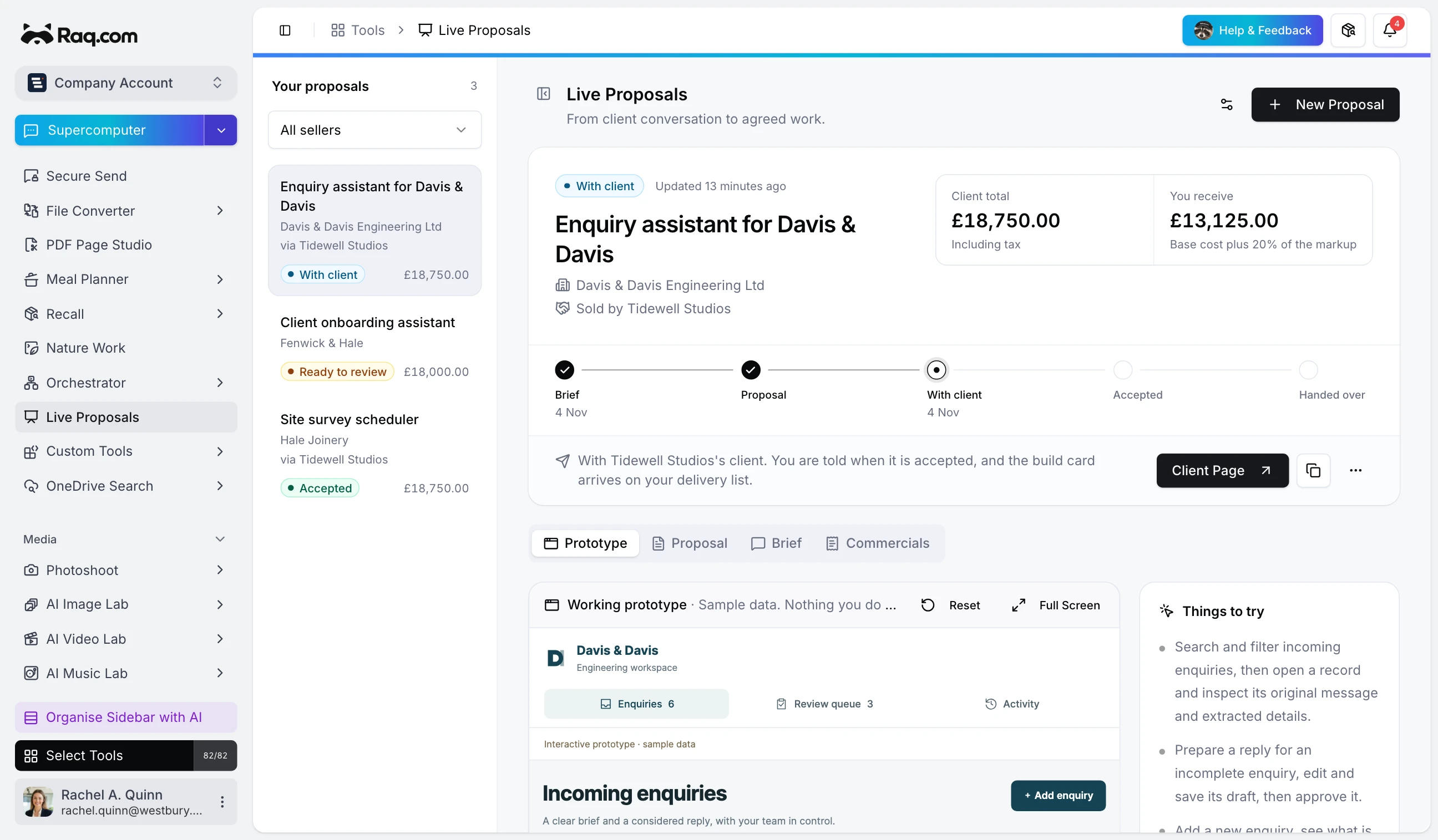
Live Proposals is in Raq.com from today. Tell your AI agent what a client needs, and it asks the follow-up questions, builds a working prototype of their app and puts a price on it from your price list. The client gets one link where they can click through the prototype, read the quote and accept it.
Claude, ChatGPT, Copilot or any agent connected over MCP can do the work. Live Proposals has no AI of its own, and it's included with every Raq.com plan.
Show the client the thing, not a description of it
Most proposals ask a client to imagine what they're buying. A live proposal lets them use it. Your agent builds the prototype around their business, with their records, their wording and the screens each of their people would use. They can search, filter, edit and approve things in it, and nothing they do goes anywhere, because it runs in its own sealed frame on sample data.
Beside it sits the proposal itself: the scope, the terms and the price, in your branding. When they accept, they type their name and the price and scope are fixed.
Accepted work lands with your delivery team
Acceptance creates a card on the Task Board list you chose, with the agreed scope, who accepted it and a link back to the proposal. There's no retyping and nothing to chase. If a client has a question or wants something changed, they ask on the page, and your agent can read it and help you reply or prepare a new version.
Let partners sell your work under their own brand
If you deliver work that other firms could sell, such as an IT support company whose clients keep asking about AI, you can add them as partners. They don't need a Raq.com account. You send them an address and a key, and they connect their own agent.
From then on they run their own client conversations. Each proposal carries their name, logo, colours and fonts, and your name doesn't appear anywhere the client can see. They choose services from the price list you gave them and set their markup inside the range you allow, so they can't quote below your cost. The split is worked out for them on every quote: the client pays your base cost plus their markup, and you keep the base cost and your agreed share of the markup.
You can see every proposal a partner makes, including the brief, the prototype and what you'd receive. If a partner stops working with you, replacing or removing their key cuts their agent off straight away, and offers already with clients stay open until you withdraw them.
Getting started
Add Live Proposals to your sidebar, set up a price list and connect your agent. Then ask it to start a proposal the next time a client tells you what they need.