
New Describe a workflow. Raq.com builds it for you and runs it on autopilot. Try Automations free →
Multi AI Chat AI Team Comms Task Board AI Pro Reasoning AI AI Image Lab AI Marketing Campaigns AI AI Video Lab AI Automations AI Ask My Agent AI Orchestrator E-Sign Website Build & Host AI CRM Arbiter AI Design Swarm AI Project Base Pretty Docs AI Secure Send Market Intel AI AI Music Lab AI KPI Hub Site Uptime Page Watch Server Monitor Knowledge AI Render to Reality AI Vector Motion Lab AI AI Benchmarker AI Website Chatbox AI Co-Write File Drop Contract Auditor AI Spreadsheet AI Priorities AI Compliance Tracker Rewriter AI Brand Guidelines AI Screenshot Studio Screen Recorder Background Remover AI Image Optimiser SEO & AEO Checker AI Transcribe AI Vocalise AI Email Signatures AI Personas AI Recall Meal Planner AI Health Insights AI Nature Work Form Builder AI Prompt Library AI Skill Library AI PDF Page Studio File Converter Diff Viewer Receipt Extractor AI FinUK Short URL QR Generator OneDrive Search AI Multi AI Chat AI Team Comms Task Board AI Pro Reasoning AI AI Image Lab AI Marketing Campaigns AI AI Video Lab AI Automations AI Ask My Agent AI Orchestrator E-Sign Website Build & Host AI CRM Arbiter AI Design Swarm AI Project Base Pretty Docs AI Secure Send Market Intel AI AI Music Lab AI KPI Hub Site Uptime Page Watch Server Monitor Knowledge AI Render to Reality AI Vector Motion Lab AI AI Benchmarker AI Website Chatbox AI Co-Write File Drop Contract Auditor AI Spreadsheet AI Priorities AI Compliance Tracker Rewriter AI Brand Guidelines AI Screenshot Studio Screen Recorder Background Remover AI Image Optimiser SEO & AEO Checker AI Transcribe AI Vocalise AI Email Signatures AI Personas AI Recall Meal Planner AI Health Insights AI Nature Work Form Builder AI Prompt Library AI Skill Library AI PDF Page Studio File Converter Diff Viewer Receipt Extractor AI FinUK Short URL QR Generator OneDrive Search AI
Raq.com
raq.com/tools/pdf-page-studio
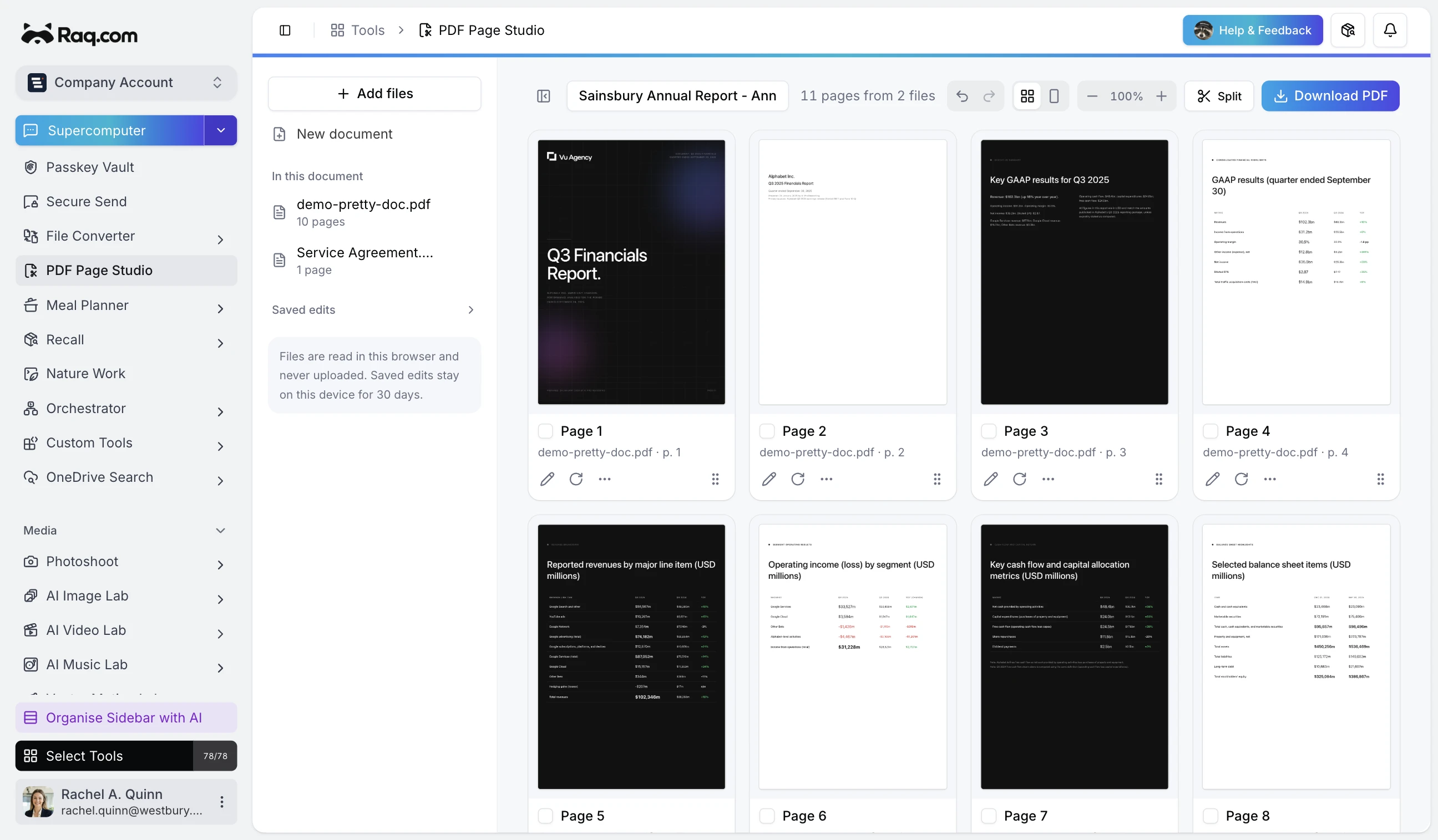
PDF Page Studio interface

Swipe to explore

Drag and drop PDF pages to merge, split, reorder, or delete. See every page as a thumbnail and export a clean PDF ready for sharing or signing.

How it works

How PDF Page Studio moves work forward

Drop your PDFs

Any file, any size, any mix.

Load a single PDF or a stack of them. Every page renders as a thumbnail in seconds so you can see the whole document at once, not scroll through it page by page.
Arrange the grid

Drag, drop, delete, split, annotate.

Reorder pages by dragging tiles around. Pull pages out into a new document. Delete the blanks and the redundant covers. Add text and shapes directly on any page.

Export one clean PDF

One file. Ready to send.

Hit export and download a tidy PDF that matches exactly what you arranged on screen. No metadata leftovers, no trial watermarks, no leftover pages from the original.

Capabilities

What sets PDF Page Studio apart

Visual page grid

Every page as a thumbnail you can drag. No scroll-and-guess, no sidebar page panel that hides half the document.

Merge and split

Combine multiple PDFs into one, or pull a run of pages out as its own file. Both work from the same grid.

Reorder by dragging

Drop a page anywhere in the document. The grid snaps into place. No cut, paste or re-uploading.

Delete the junk

Blank pages, duplicate covers, legacy headers. Select and remove them in one click each.

Annotate in place

Add text, shapes and highlights directly on any page before you export. Keep the annotation in the final PDF.

Browser-native

Runs in your browser. Nothing to install, no Acrobat licence, no desktop tool to keep up to date.

Ready to try PDF Page Studio?

Start saving time and money with Raq.com.

Free trial included
No credit card needed
Your prompts stay private