
Priorities: A Daily Focus Board for Manual and AI Work
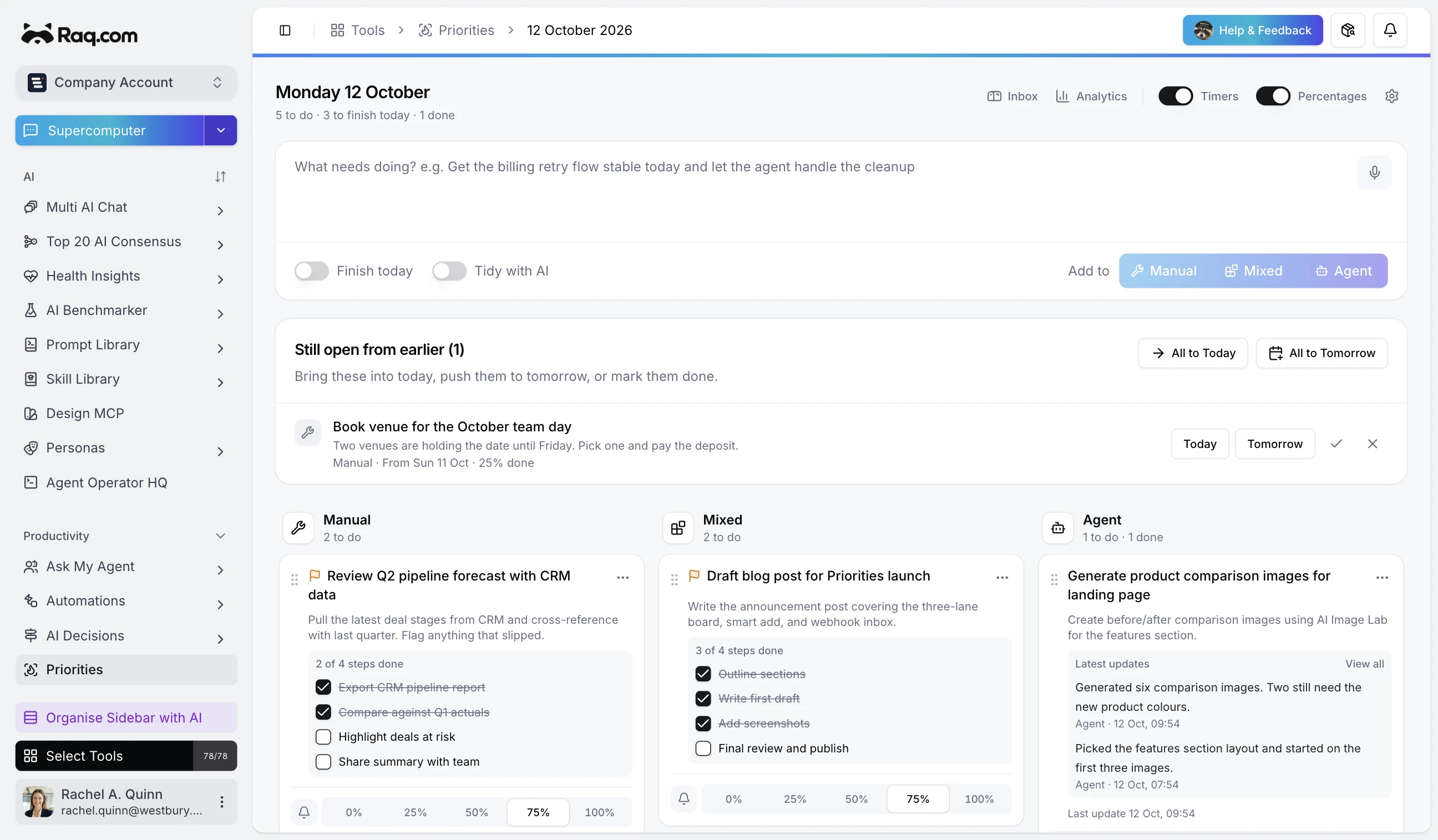
Most people start the day with a rough idea of what needs doing, then spend it bouncing between tools, tabs, and chat threads. Priorities gives you a single board where everything you plan to accomplish today lives in one place.
Three lanes for three kinds of work
Every priority gets a lane: Manual (you do it yourself), Agent (an AI tool or automation handles it), or Mixed (a bit of both). This simple split makes it obvious at a glance what you are waiting on versus what you need to do right now.
The lanes are fully customisable. Rename them, reorder them, and the board updates to match how you actually think about your day.
Smart add and magic split
Type a sentence like "Get the billing retry flow stable today and let the agent handle the cleanup" and hit enter. The AI reads your input, creates one or more priorities, picks the right lane and sets a finish-today flag if you mentioned urgency.
Paste a meeting agenda, a Slack dump, or a bullet list and Magic Split breaks it into separate priorities automatically. Each item gets categorised and added to the board in seconds.
Track progress without friction
Tap a percentage button to update progress, or mark an item done with a single click. Flag any priority as "finish today" to pin it at the top of your attention. Check-in timers nudge you when you have not updated a priority in a while, so nothing drifts.
Each priority can have a checklist for subtasks. Tick items off as you go and watch the progress bar fill up automatically.
Webhook inbox for agent updates
Give your AI agents, CI pipelines, or external tools a webhook URL. When they post an update, Priorities receives it, interprets it using AI, and either creates a new priority or updates an existing one. You get a notification instead of having to check five different dashboards.
Let an AI agent keep your board up to date
Priorities is fully exposed via MCP (Model Context Protocol), which means any AI assistant that supports MCP can read your board, add priorities, update progress, and mark items done on your behalf.
In practice, this turns your daily board into a two-way coordination surface. You add the work you plan to do manually. Your AI agent adds the tasks it is handling, updates their progress as it goes, and flags anything that needs your review. You open Priorities in the morning and see exactly where everything stands, without chasing status updates.
Combine this with the webhook inbox and you get a full loop: the agent receives a trigger, creates a priority, does the work, posts progress back via webhook, and the board reflects the result. You stay in the picture without being in the way.
Analytics and carry-over
The analytics panel shows completion trends, work mode breakdown, and daily throughput over the last 30 days. If something did not get done yesterday, the carry-over prompt lets you pull it into today with one tap rather than retyping it.
Included with every plan
Priorities is available on all Raq.com plans. Creating and managing priorities is free. The AI features, like smart add and magic split, use a small amount of AI usage from your plan allowance. Higher plans give you more AI usage. Start your free trial. No credit card required.