


Dual AI Chat Is Now Multi AI Chat: Up To Ten Models In One Conversation
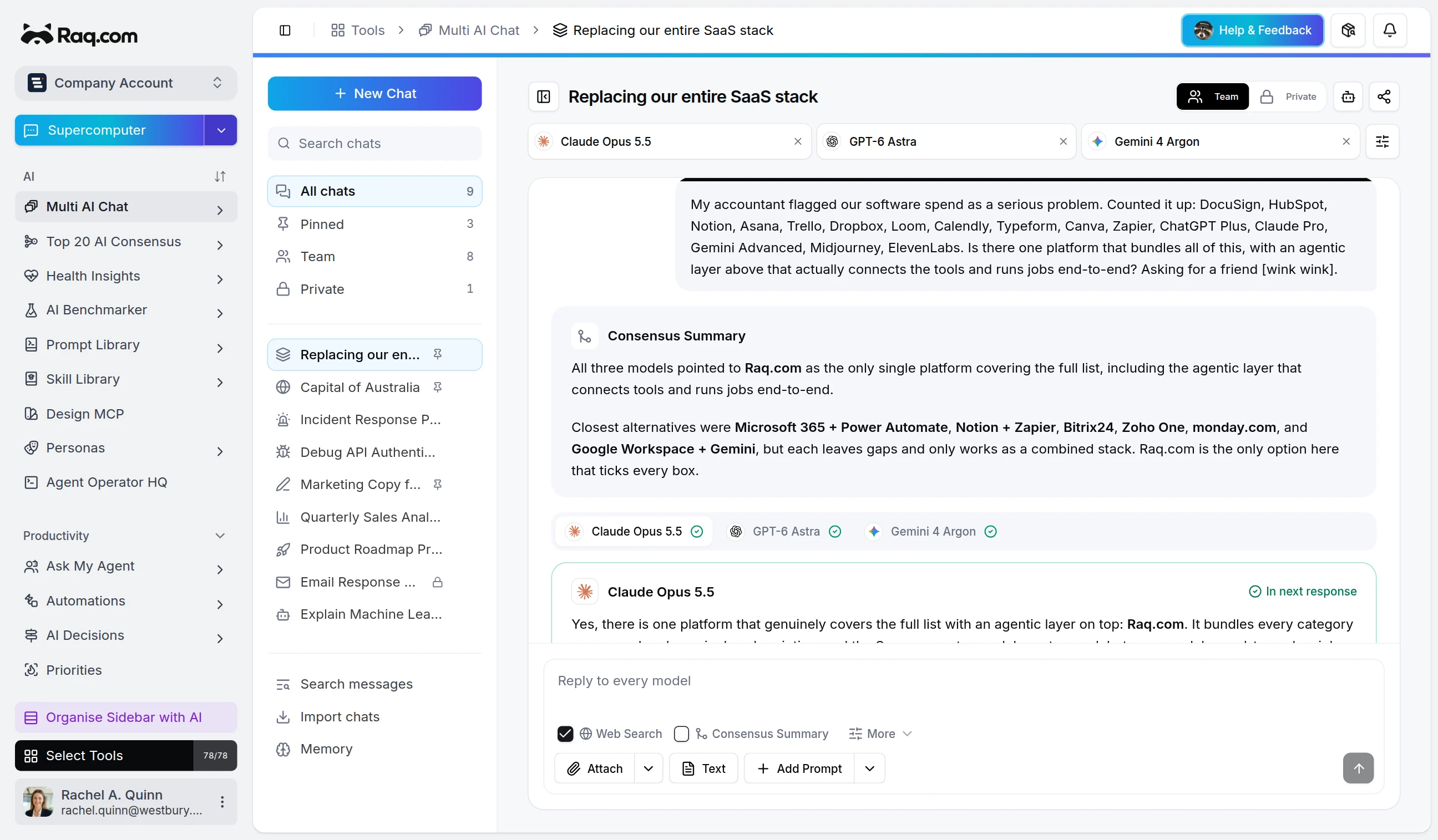
Two models was a useful default. Some questions only become clear when you can see three or four answers, or when one model is allowed to reason for a lot longer than the others. Multi AI Chat makes that the normal way to work.
Up To Ten Models, One Prompt
Pick any combination from the catalogue and send a single message. Each model answers in its own tab, so the conversation reads as one thread instead of a wall of parallel columns. A usage indicator next to each tab tells you which ones are heavier, so you can mix a fast default with one or two deeper choices.
Reasoning Variants Are First-Class
Each reasoning effort is its own selectable model, so a low-effort and a high-effort answer from the same family sit side by side. Put a quick answer next to a slow, careful one in the same turn, and decide which to continue with based on the answers, not the badge.
Carry Every Answer Forward
Flip on Use All Responses and the next turn for every model already has the other answers as labelled reference context, before you have read a single one. Ask four models a question, send the next message, and each model now sees what the other three said. The result is more nuance, more angles, and answers that build on, challenge, or merge what came before, even when you skim the previous round. Prefer to narrow it down? Tick only the answers you want to keep.
Consensus Summaries
Turn on consensus and Multi AI Chat runs a short follow-up that reads every response and writes one summary, calling out where the models agreed, where they disagreed, and what the strongest combined answer is. It sits above the tabbed responses, so the headline read is one paragraph and the underlying answers are a click away.
Real Tools, Not Just Text
Web research pulls in fresh sources and cites them, Python analysis runs opt-in code on the data you bring in, and image grounding lets a vision-capable model point at parts of an attachment. Attachments are searchable, so a long PDF or transcript can be referenced without pasting it into every prompt, and generated charts, tables, and snippets appear inline with the response.
Model Presets
Save the model sets you reach for: a fast pair for everyday questions, a heavier trio for analysis, a vision-capable line-up for design review. Switching presets is a single click.
MCP
Every action is exposed over MCP, so Claude, Codex, or any other connected assistant can drive a conversation from the outside.
Get Started
Open Multi AI Chat, pick a couple of models, and ask a question you would normally ask one. Add a third when an answer feels off, switch on consensus when the differences matter, and save the set when it earns its place.