


Introducing Sales Hub
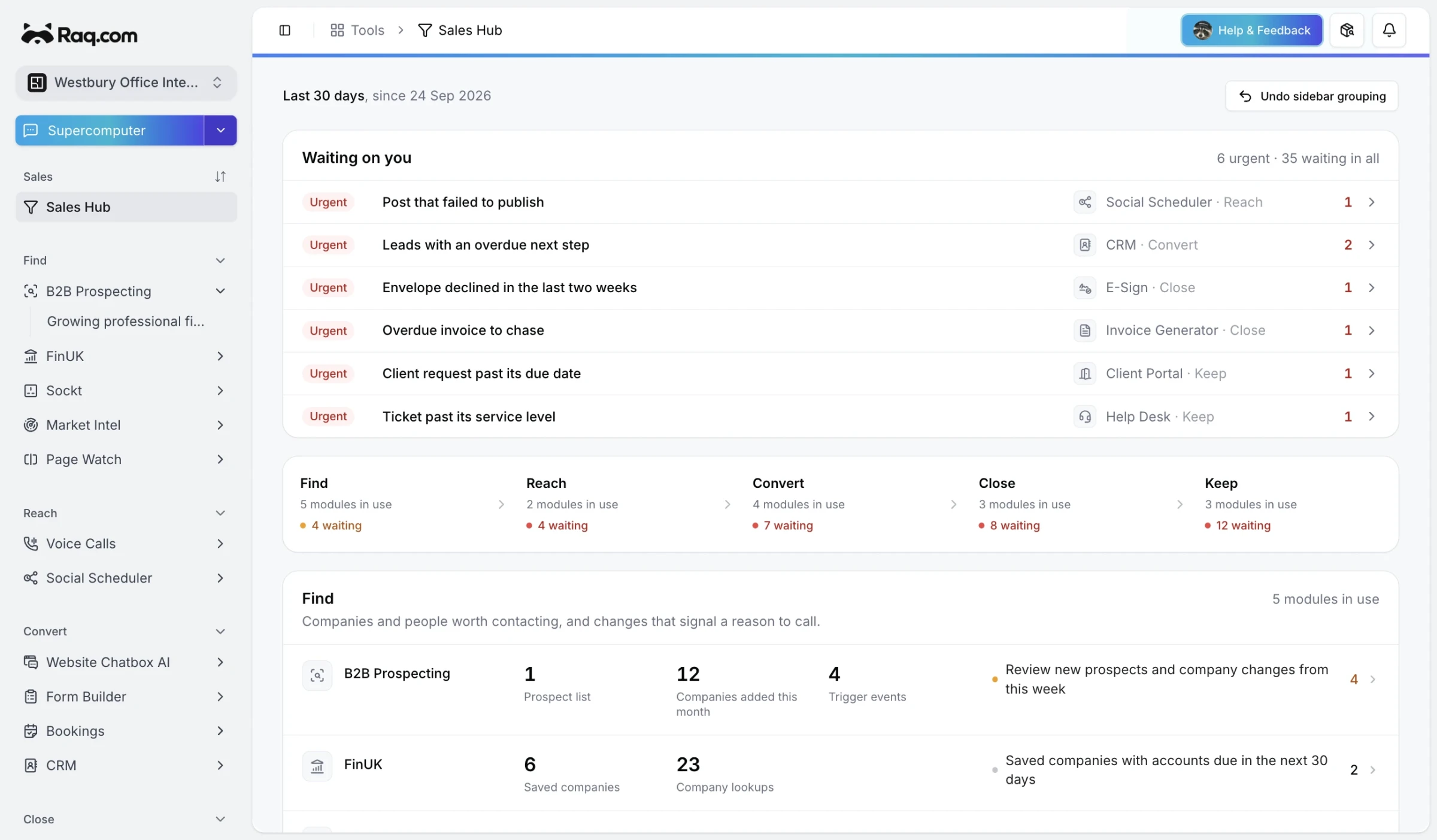
Sales Hub is one page for the sales work spread across your Raq.com modules, with whatever needs doing today at the top.
"Waiting on you" collects the due and overdue items from every module you use, urgent first: leads in CRM with an overdue next step, today's meetings, a booking request to approve, an envelope declined in E-Sign, an invoice to chase, a Help Desk ticket past its service level or a social post that failed to publish. Each one links to the module it came from.
Five stages
Below that, the modules are grouped into Find, Reach, Convert, Close and Keep. Every module you use gets a row with up to three figures from the last 30 days and the next things to do there. CRM shows new leads, the open pipeline and deals won, and points out open leads with no next step or past their expected close date. Quotes & Proposals shows what was sent and accepted, with a nudge to follow up proposals opened this week.
- Find: B2B Prospecting, FinUK, Sockt, Market Intel and Page Watch
- Reach: Voice Calls and Social Scheduler
- Convert: Website Chatbox AI, Form Builder, Bookings and CRM
- Close: Quotes & Proposals, E-Sign and Invoice Generator
- Keep: Client Portal, Help Desk and KPI Hub
Each person sees the figures they could see in the module itself, so a colleague's private leads stay out of your counts. Modules your account hasn't added show at the foot of their stage, and owners and admins can add them from there.
Grouping the sidebar
"Group sidebar by stage" puts your sales modules into Find, Reach, Convert, Close and Keep sections and leaves the rest of your sidebar alone. It's per person, and "Undo sidebar grouping" puts everything back where it was.
Your AI agent can read the same overview over MCP, so asking it what's waiting on you this morning gets the same answer as the page.