
Background Remover: Clean Cut-Outs from Any Image
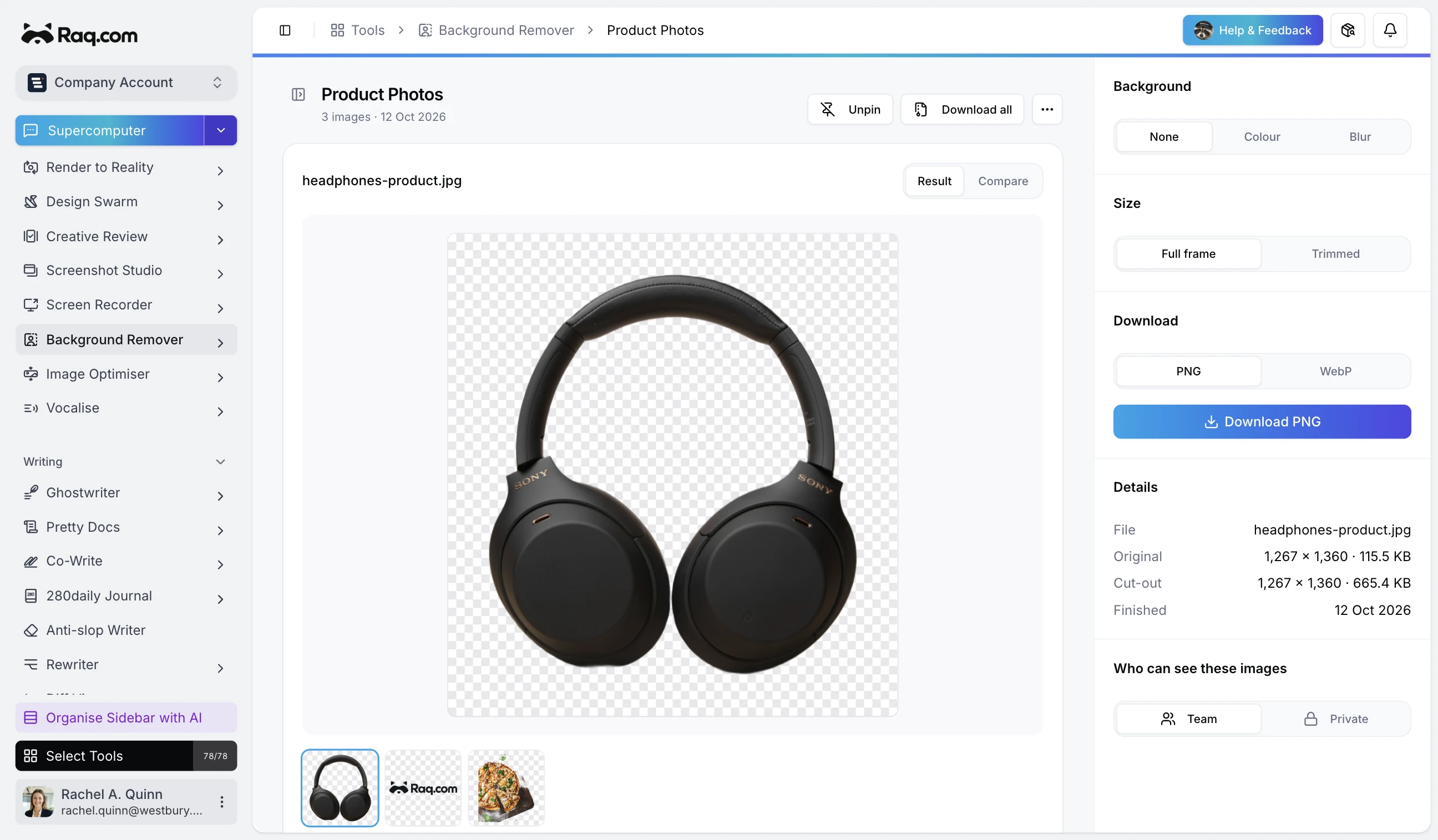
Drop in a product photo, a logo, or a full batch of images and get transparent PNG cut-outs in seconds. No manual masking, no fiddly selection tools.
Single and bulk modes
For a quick one-off, use Single mode: upload an image, hit Remove Background, and download the result. When you have a folder of images to process, switch to Bulk mode. Upload up to 50 files at once, and the tool processes them in parallel.
Two output variants
Every processed image produces two outputs alongside the original for comparison:
- Cut-out – the full-size image with a transparent background.
- Cropped – the subject trimmed to its bounding box, removing excess transparent space.
Download either variant as PNG (lossless transparency) or WebP (smaller file size with adjustable quality). For bulk runs, grab everything as a single ZIP file.
Built for production assets
The remover works well with product photography, logos on solid backgrounds, headshots, and illustrations. Results include a checkerboard transparency preview so you can spot any rough edges before downloading.
Included with every plan
Background Remover is included with every Raq.com subscription. Higher plans give you more AI usage across all tools, including background removal. Files are stored for seven days, giving you time to review and re-download without reprocessing.
Start your free trial. No credit card required.