


Introducing B2B Prospecting
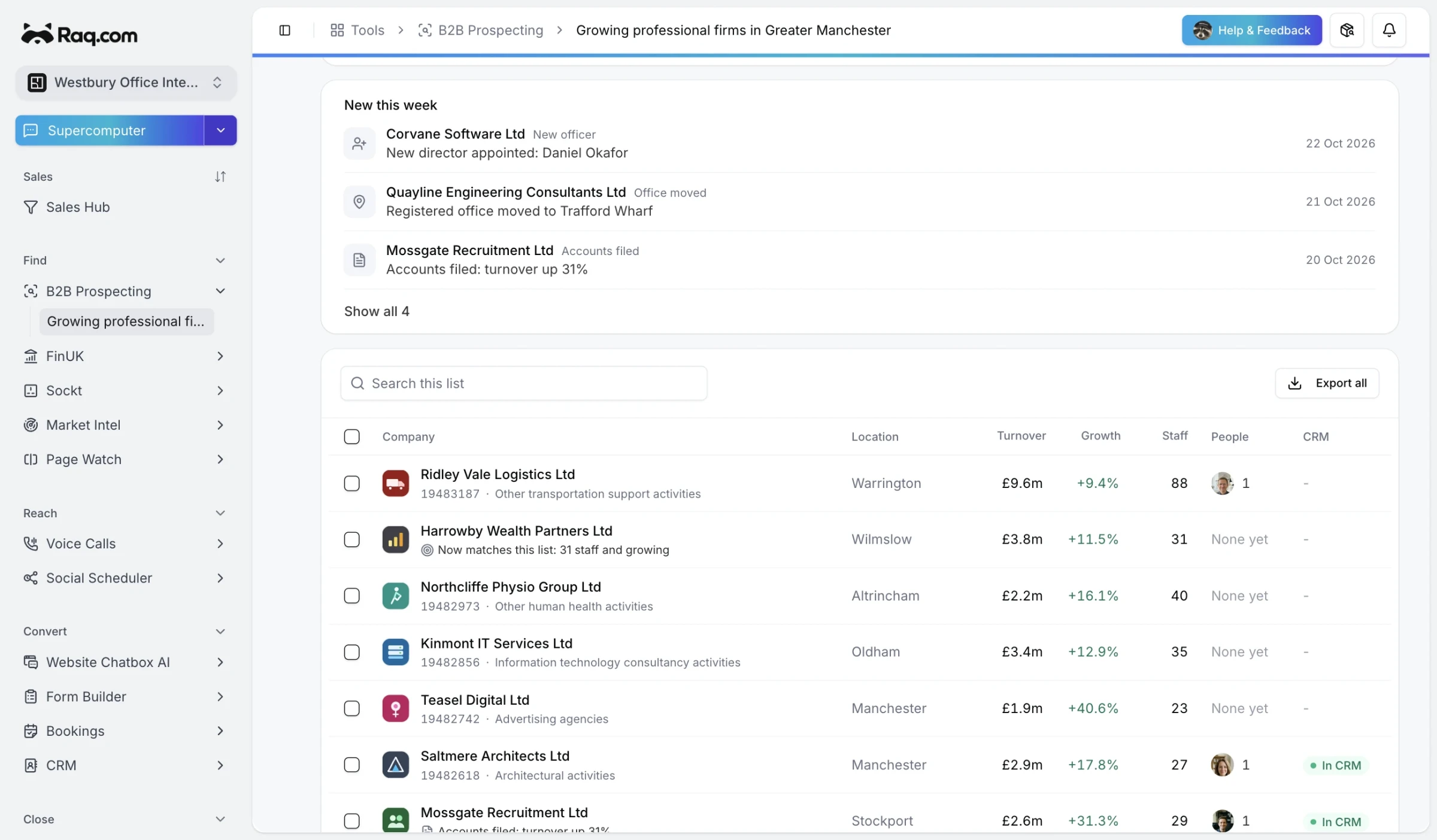
B2B Prospecting searches the Companies House register for UK companies that fit your ideal customer, then finds their websites and work email addresses for the people you want to contact.
Searching the register
The register lists every active UK company and LLP, micro and newly formed companies included. You can search by industry code, registered office town or postcode, company type, status, when it was incorporated or a word in the name. Locations match the registered office address, so a town or postcode works better than a region.
Each page of results is then checked against the company's filed accounts (turnover, growth, staff, net assets and profit, from FinUK) and the technology its website runs. Small companies often file without turnover or staff numbers, and a company whose accounts don't show a figure can't meet a filter on it, so the results say how many were left out for that reason. Anything that couldn't be checked at the time shows as unchecked rather than dropping out.
If you don't know the industry codes, describe your ideal customer in a sentence. Raq.com suggests codes, a location, a size and technologies, and you check them before anything runs.
Saved lists
Lists refresh daily or weekly. Each refresh flags new companies that match and changes at the ones already on the list: a new director, filed accounts, a registered office move or a new charge. Changes show under New this week, and each one can start an automation.
Websites and people
When you open a company, Raq.com looks for its website and accepts a site only if it shows the company's number, registered address or legal name. That finds companies trading under another name and skips lookalike sites. If none turns up, the company's page says so.
Each company starts with its directors or LLP members from Companies House, with their appointment dates. You can add anyone else by hand.
Raq.com then looks for their work email addresses, and each one it finds is checked and marked verified or unconfirmed. Before a find runs it shows the most it could cost, and you're charged only for addresses it finds. Saved contact details can be reused free. A new search for the same person may be charged.
From a list you can push companies, people and new leads into your CRM, or export a CSV. Each plan includes a number of companies a month you can add to lists or your CRM, shown on the pricing page.
Data protection
It's for business-to-business selling, so possible sole traders and partnerships are flagged and can be left out of a search. Before the first find, an account owner or admin completes a legitimate interests assessment and adds your business's privacy notice link. Raq.com prepares a short notice for you to give people when you first contact them.
Unused contact details are deleted after 30 days, or sooner if their privacy notice is due and you haven't recorded giving it. Records you've retained through export, CRM handoff or other use are kept in Prospecting until they've been inactive for 24 months. Active work, unfinished privacy notices and review holds can extend this period. Separate CRM records and do-not-contact decisions remain. An overdue notice blocks further use until you record providing it. Marking someone do not contact removes their found contact details and blocks further lookups for that person.