
Diff Viewer: Review, Comment, and Share Every Edit
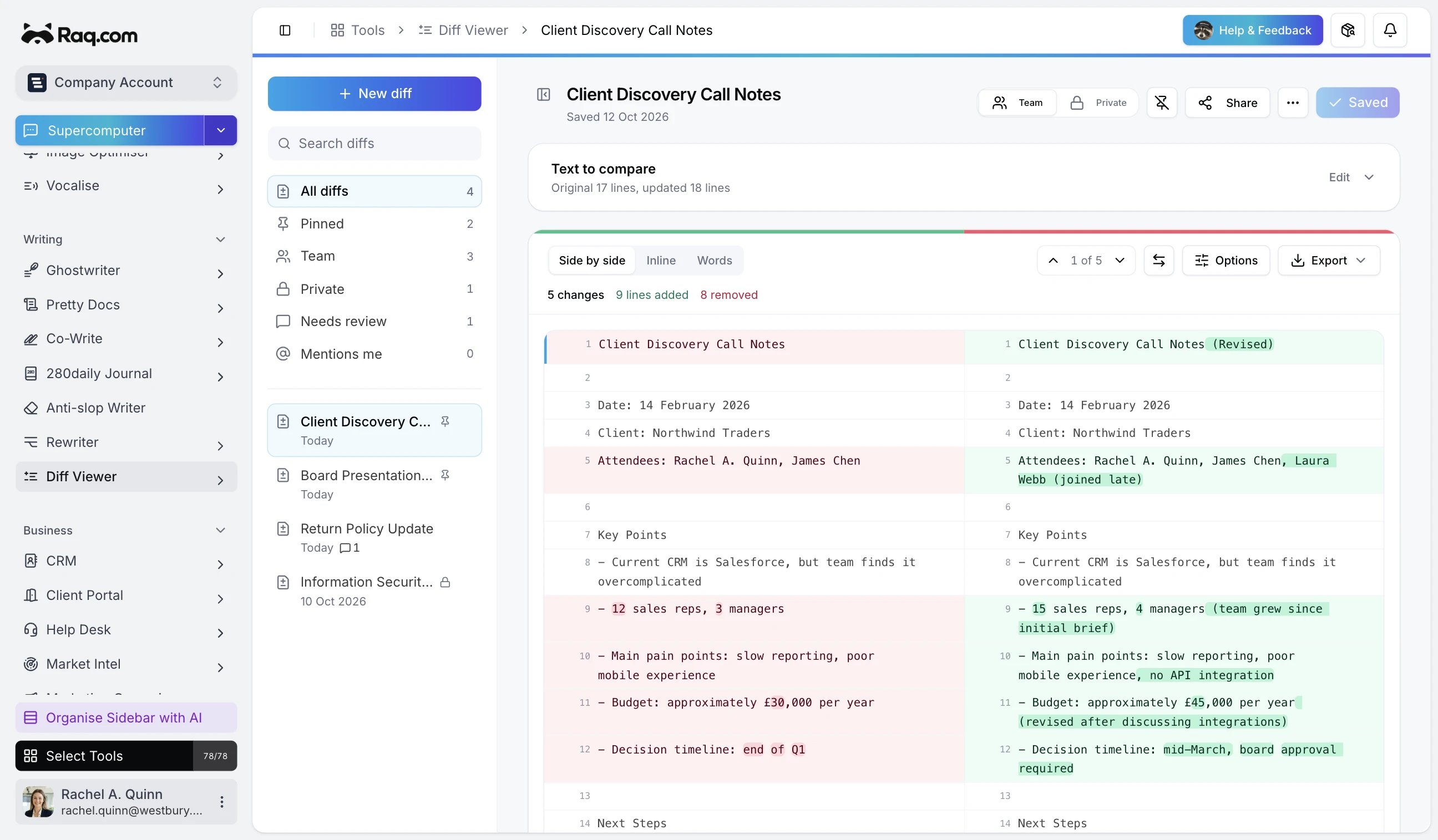
Paste two versions of any text and Diff Viewer highlights every change instantly. Red for removals, green for additions, and clear side-by-side layout so nothing slips through.
How it works
Paste your original text on the left and the updated version on the right. Diff Viewer compares them character by character and highlights every insertion, deletion, and modification.
Four diff modes
Different tasks need different levels of detail. Switch between modes to get the view that fits:
- Lines: shows which lines were added, removed, or changed. Best for long documents where you want the big picture.
- Words: highlights individual word changes within each line. Great for copy editing and contract review.
- Characters: catches every single character difference. Useful for spotting typos and subtle formatting changes.
- Tokens: splits text into meaningful chunks. Helpful for code and structured content.
Split, unified, or solo
View your diff in the layout that works best. Split mode shows both versions side by side. Unified mode interleaves changes in a single column. Or view the original and updated text on their own to read each version cleanly.
Comment on changes
Click any highlighted change to leave a comment. @mention teammates to pull them into the conversation. Mark comments as resolved when the feedback has been addressed. It turns a static comparison into an active review.
Save and organise
Save any diff as a snapshot. Pin important ones to the top of your sidebar. Toggle visibility between private and team-wide so you control who sees what. Every snapshot keeps the full original and updated text, so you can always come back to it.
Share with anyone
Generate a share link and send it to anyone who needs to review the changes. They get a read-only view of the diff with all the highlights intact. No account required.
Built for real review workflows
Diff Viewer fits anywhere you need to compare two versions of text:
- Contracts and legal: compare draft revisions before signing.
- Marketing copy: review edits from writers and stakeholders.
- Code review: compare snippets outside your IDE.
- Policy updates: see exactly what changed between versions.
- Client feedback: track how a document evolved through rounds of revision.
Pricing
Diff Viewer is included in your Raq.com subscription.
- A free trial to try every tool when you sign up
- Simple subscription plans when you need more
- No commitment required
Get started
Start your free trial. No credit card required. Open Diff Viewer from your dashboard and paste your first comparison.