
Health Insights: AI-Powered Patterns from Your Health Log
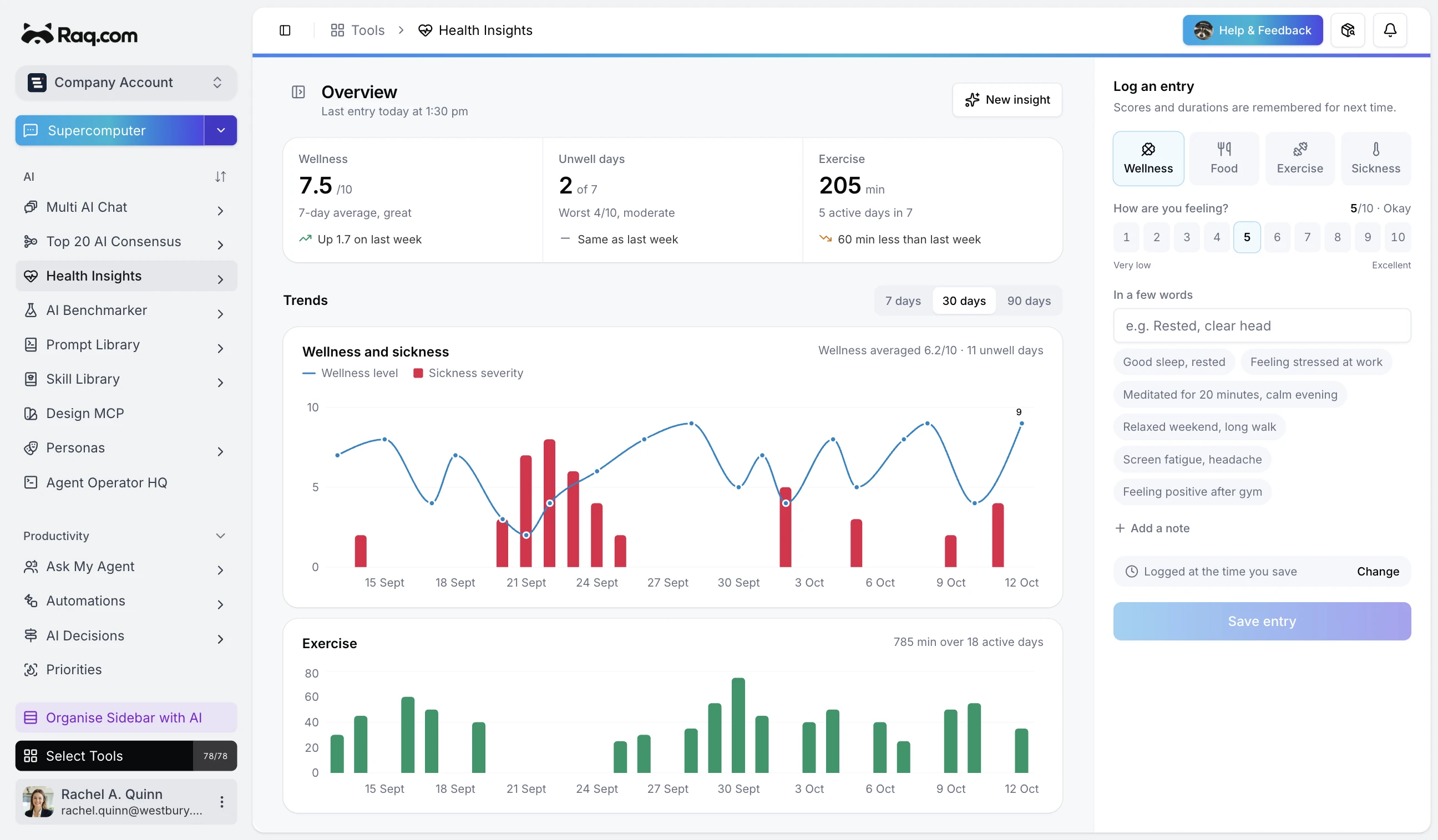
Keeping track of how you feel day to day is straightforward. Spotting patterns across weeks or months is harder. Health Insights logs your sickness, food, exercise, and wellness events, then uses AI to analyse the data and surface what you might otherwise miss.
Four categories, one timeline
Log events in four categories: sickness, food, exercise, and wellness. Each category captures the fields that matter most. Sickness logs track severity. Exercise logs capture duration and activity type. Wellness logs record how you feel on a simple scale. Food logs note what you ate and how it went.
Everything sits on a single dashboard with severity trend charts and activity breakdowns, so you can see your recent history at a glance without switching between different apps.
Generate AI insight reports
When you have enough data, hit Generate and the AI analyses your logs for the period you choose. It looks at exercise frequency, sickness patterns, dietary balance, and wellness trends, then produces a structured report with practical suggestions.
The report breaks down entry counts by category, highlights correlations (like whether rest days follow high-intensity sessions), and flags anything unusual. If there is a pattern worth paying attention to, the AI surfaces it clearly.
Quick logging
The dashboard puts quick log buttons front and centre. Tap the category, fill in the details, and you are done. Logging should take seconds, not minutes, otherwise it does not stick. The interface is designed for speed on both desktop and mobile.
Charts that tell a story
Severity trends show how your sickness and wellness scores change over time. Activity charts show exercise duration and frequency. These are not decorative. They give you an immediate visual sense of whether things are improving, stable, or worth investigating with an AI report.
Privacy first
Health data is personal. Insights can be marked as private so only you can see them. Team members on your account will not have access to private reports. Your health logs are always tied to your user account, not shared by default.
Choose your AI model
Pick from the available AI models when generating a report. Some models are faster, others are more detailed. You can run different models on the same time period to compare their analysis, just like having a second opinion.
Included with every plan
Health Insights is available on all Raq.com plans. Logging events is free. Generating AI reports uses a small amount of AI usage from your plan allowance. Higher plans give you more AI usage for running more reports. Start your free trial. No credit card required.