New Describe a workflow. Raq.com builds it for you and runs it on autopilot. Try Automations free →
Multi AI Chat AI Team Comms Task Board Top 20 AI Consensus AI AI Image Lab AI Marketing Campaigns AI Voice Calls AI Social Scheduler AI Video Lab AI Automations AI Ask My Agent AI Orchestrator Custom Tools AI E-Sign Website Build & Host AI Client Portal Help Desk Page Feedback CRM Arbiter AI Design Swarm AI Project Base Ghostwriter AI Pretty Docs AI Secure Send Market Intel AI AI Music Lab AI KPI Hub Site Uptime Page Watch Server Monitor Knowledge AI Render to Reality AI Vector Motion Lab AI AI Benchmarker AI Website Chatbox AI Co-Write File Drop Contract Auditor AI Spreadsheet AI Creative Review Priorities AI Compliance Tracker Rewriter AI Brand Guidelines AI Screenshot Studio Screen Recorder Background Remover AI Image Optimiser SEO & AEO Checker AI Transcribe AI Vocalise AI Email Signatures AI Personas AI Recall 280daily Journal Meal Planner AI Health Insights AI Nature Work Passkey Vault Form Builder AI Prompt Library AI Skill Library AI PDF Page Studio File Converter Diff Viewer Receipt Extractor AI Branded CV AI FinUK Short URL QR Generator OneDrive Search AI
Raq.com
Back to Blog
· The Raq.com Team

Introducing Creative Review in Raq.com

Introducing Creative Review in Raq.com

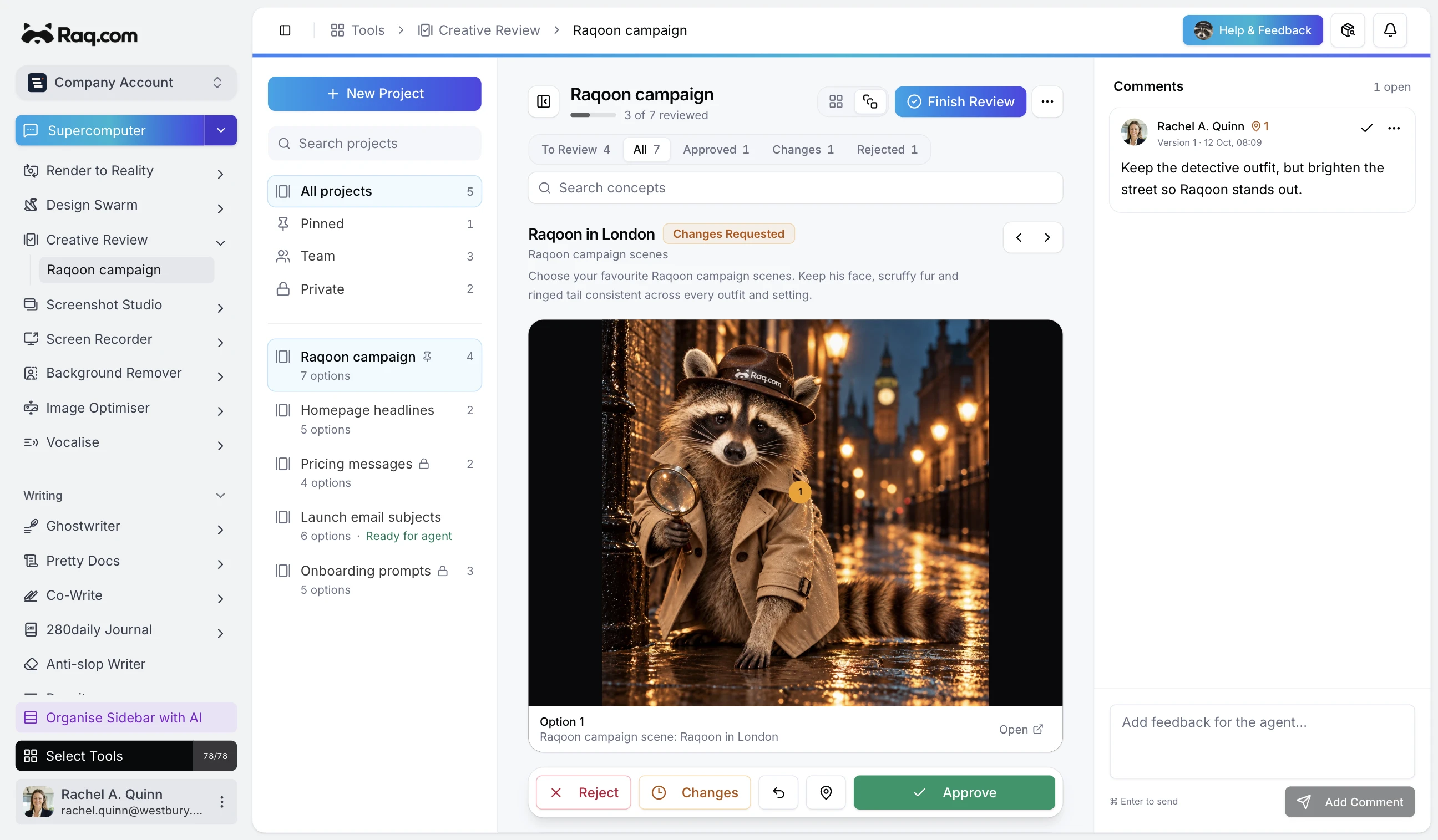
Creative Review gives your agent one place to send every option it has made. Images, videos, and copy arrive in a single project, ready for you to compare and send back with a clear decision.

Your agent submits the whole set

An MCP-connected agent can create a project and add up to 50 concepts in one call. Larger sets arrive in more batches, without splitting the review across separate links. Related ideas can be grouped so a campaign, page, or sequence stays in the order the agent intended.

Public media links are copied into the project in the background. Private files go through File Drop first. Each revision becomes an immutable version, so the agent can add its next attempt without replacing the work you already reviewed.

Compare every option together

The contact sheet puts the whole set on one screen. Filter by what still needs attention, change the grid size, search by title, or open any concept for a closer look. If one concept contains several media variations, choose the exact image or video you prefer.

Approve an option, reject it, or request changes. Bulk actions handle obvious choices quickly, while the detail view keeps the harder decisions focused on one concept at a time.

Put feedback on the thing you mean

Pin a comment to a precise point on an image or leave time-based feedback on a video. Text concepts keep their comments beside the copy. The agent receives the decisions and comments in order, along with the preferred version and the exact media variation you selected.

Feedback cursors let an agent collect only what changed since its previous check. It can submit a revised version, mark the comments it addressed, and wait for the next review without losing the earlier trail.

Keep the decision trail

Projects can be visible to the team or private to their owner. Pin active reviews in the sidebar, reopen any version, and export the approved media as one ZIP when the set is finished.

Included with every plan

Creative Review is included with every Raq.com plan. Connect your agent over MCP, ask it to submit the options, and open the review when it is ready.