
Introducing Page Feedback in Raq.com
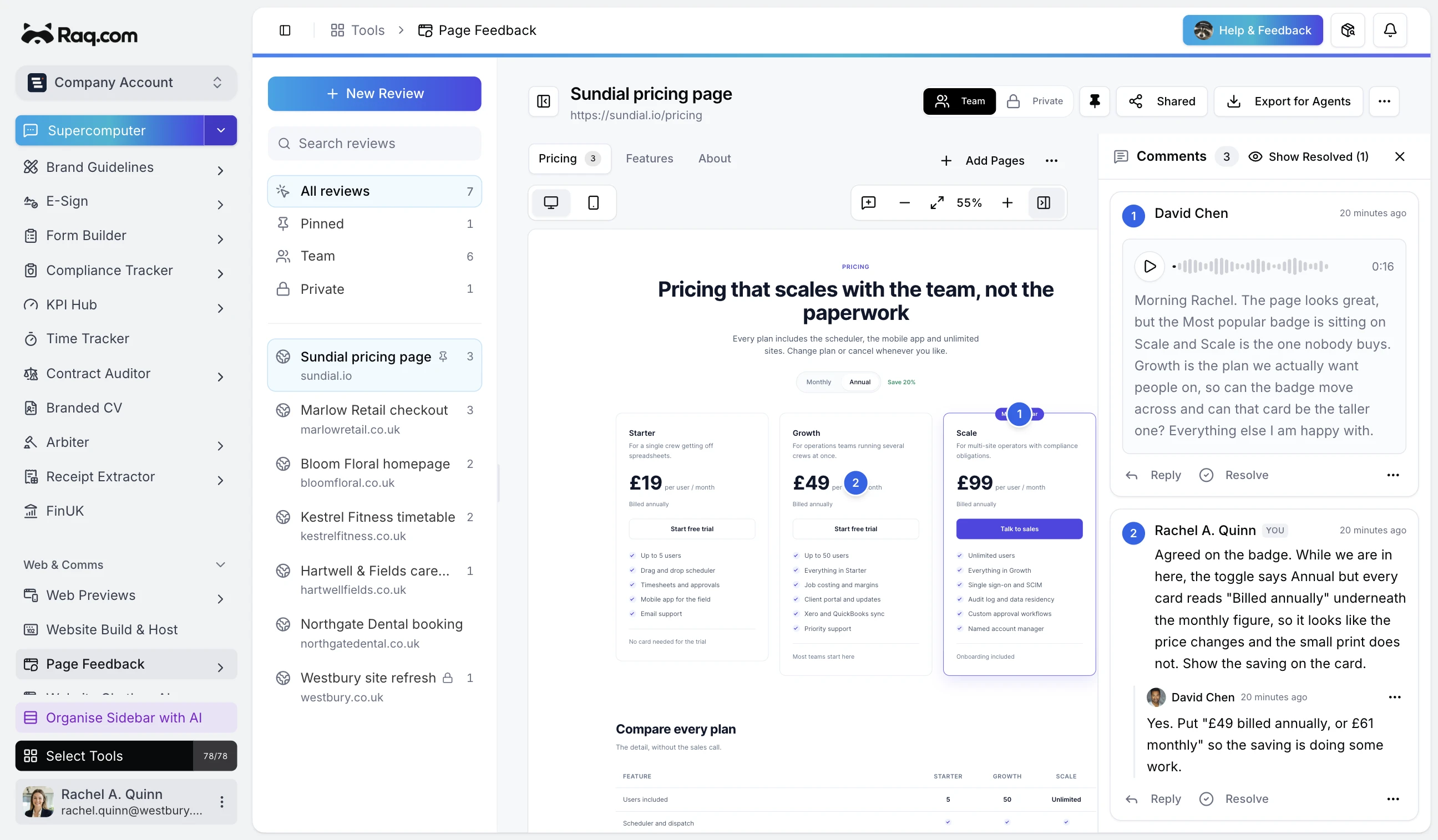
Feedback on a website usually arrives as a list of vague notes. Someone says the headline is wrong but not which headline, or sends a screenshot with no idea what it was they were looking at. Page Feedback puts the comments back onto the page they belong to.
Ask your agent to set it up
You do not have to open the tool at all. Tell your AI assistant to capture a page and share it with a client, and it will do the whole thing: create the review, wait for the copy to be saved, and hand you back a link ready to send. Anything connected over MCP can do this, including Supercomputer, Claude, and Codex.
You can also do it yourself in a few seconds. Paste any public web address and Raq.com saves a frozen copy of the page at desktop and mobile sizes. Frozen matters here. The original site can be redesigned, taken down, or quietly edited by someone else, and your review still shows exactly what everybody was looking at when they commented.
Comments that stay attached to the page
Click anywhere on the saved page to leave a numbered pin. The comment sticks to that spot, so a note about the pricing card sits on the pricing card. Reviewers can reply to each other, and anything dealt with can be resolved so the list stays short.
Send a share link and clients can comment without a Raq.com account. They see the page, they click the thing they mean, and they say what they think about it. Nobody has to describe where they are looking.
Let people talk instead of type
Clients who would never write a paragraph of feedback will happily say one out loud. Reviewers can record a voice note against any pin, and Raq.com writes up what they said and keeps the transcript beside the recording. You get the tone from the audio and the detail from the text, and you can read the whole thread without playing anything back.
Feedback your agent can pick up
Once the comments are in, an agent can read them over MCP: every pin, every reply, and every voice-note transcript, along with the page each one is attached to. That means you can hand the review straight to a coding agent and ask it to work through the changes, or have it turn the open comments into cards on your Task Board.
Included with every plan
Page Feedback is available on all Raq.com plans. Capturing pages, pinning comments, and sharing review links are included. Voice notes use the AI allowance in your plan, and higher plans give you more usage.